Replacing a Glacier Bay 35 mm Ceramic Cartridge, Step by Step
A single-handle Glacier Bay faucet that drips from the spout, or will not shut off completely, often comes down to one part: the ceramic cartridge under the handle. Glacier Bay's troubleshooting chart puts a faucet that will not shut off completely down to a dirty or broken cartridge, to be cleaned or replaced. You change it from above, with the faucet still on the sink. Plan on about 20 minutes.
The steps below follow Glacier Bay's use and care guides. Where those guides leave a step out, we used Danco's instructions for its version of this cartridge and a few well-known repair guides, and we name each one. The full list is at the end.
First, make sure it is the 35 mm cartridge
Not every single-handle Glacier Bay faucet takes this cartridge. The Glacier Bay guides we read list different cartridge part numbers for different faucets, and none of them prints the cartridge size, so the old cartridge is the thing to trust. Take it out (steps 1 to 5 below) and check it against this one:
- 35 mm across the body, about 1-3/8 in. Single-lever cartridges also come in a smaller 25 mm size. A 25 mm cartridge will not seat in a 35 mm faucet body, and this 35 mm cartridge does not fit a body made for 25 mm.
- A square stem that the handle fits over.
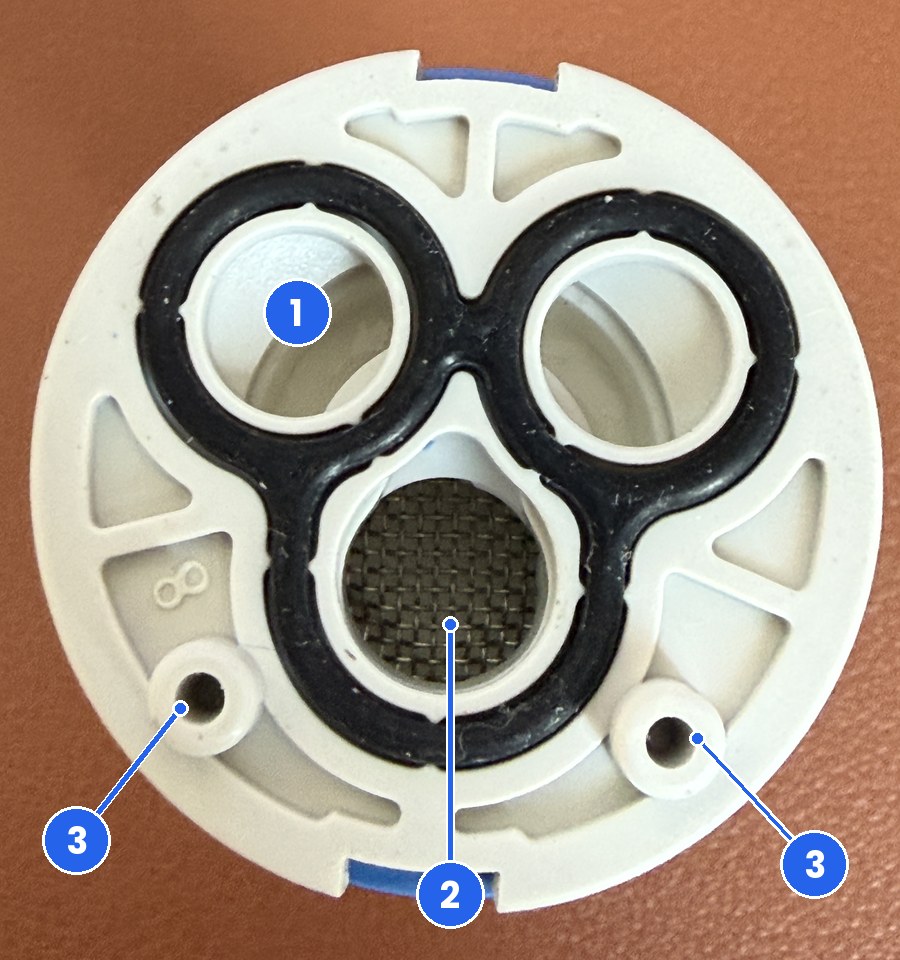
- Three ports in the base, ringed by one black seal, with two locating pegs beside them.
- N35.DW printed on the side of the body.
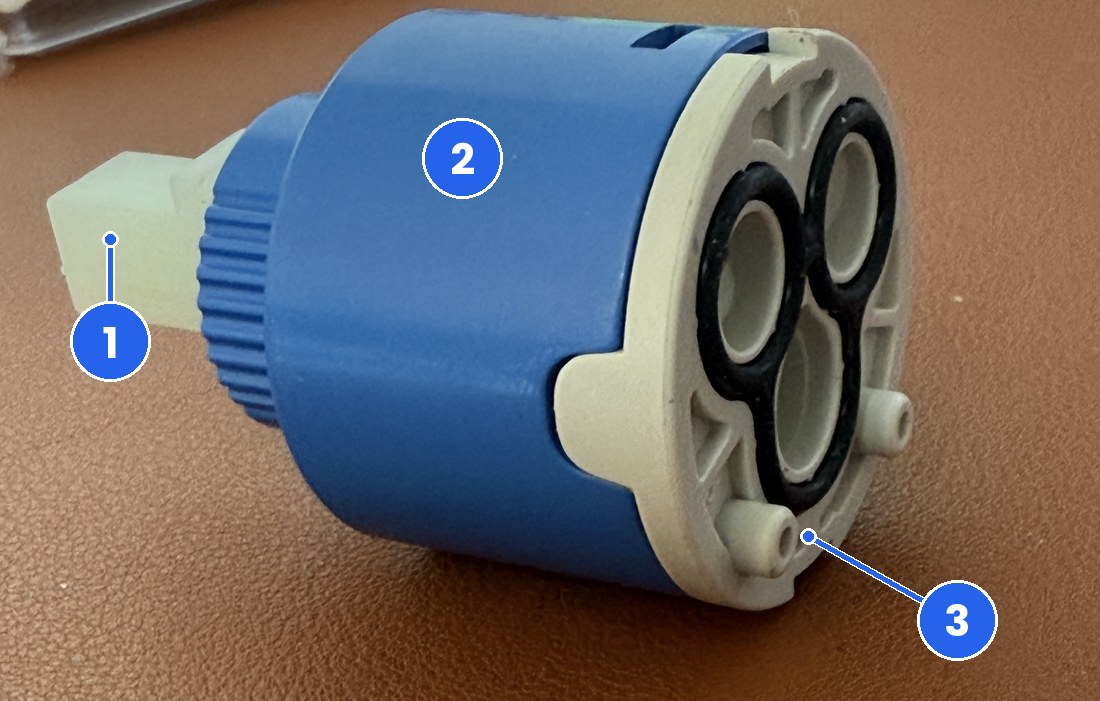
The FourHome cartridge is sold as a replacement for the cartridge in Glacier Bay single-handle faucet models 169-640, 704-612 and 704-615. Danco lists the same three models, as single-handle bathroom faucets, for its own version, the GB-1 ceramic cartridge for AquaSource and Glacier Bay single-handle faucets. It does not fit two-handle faucets or tub and shower valves. If your old cartridge does not match, our sister site Stems & Cartridges keeps a Glacier Bay cartridge and stem index to help you identify it.
What you need
- A set of hex keys for the handle screw. Glacier Bay's guides do not give the size. One AquaSource faucet guide lists a 1/8 in. hex wrench among the parts in the box, so start there and make sure the key fits snugly before you turn it.
- Adjustable pliers or an adjustable wrench for the retaining nut.
- A clean cloth, and white vinegar or a cleaner made to remove mineral build-up.
- A towel or a stopper to cover the drain.
- The new cartridge. The retaining nut and the cap from your faucet are reused.
Glacier Bay's guides give the same caution every time: always turn off the water supply before replacing any part of the faucet, then open the faucet handle to relieve the water pressure and make sure the water is completely shut off. The shutoffs are usually the two small valves under the sink, one hot and one cold. Glacier Bay also says to cover the drain so you do not lose small parts.
Replace the cartridge, step by step
Step 1: Shut off the water and open the faucet
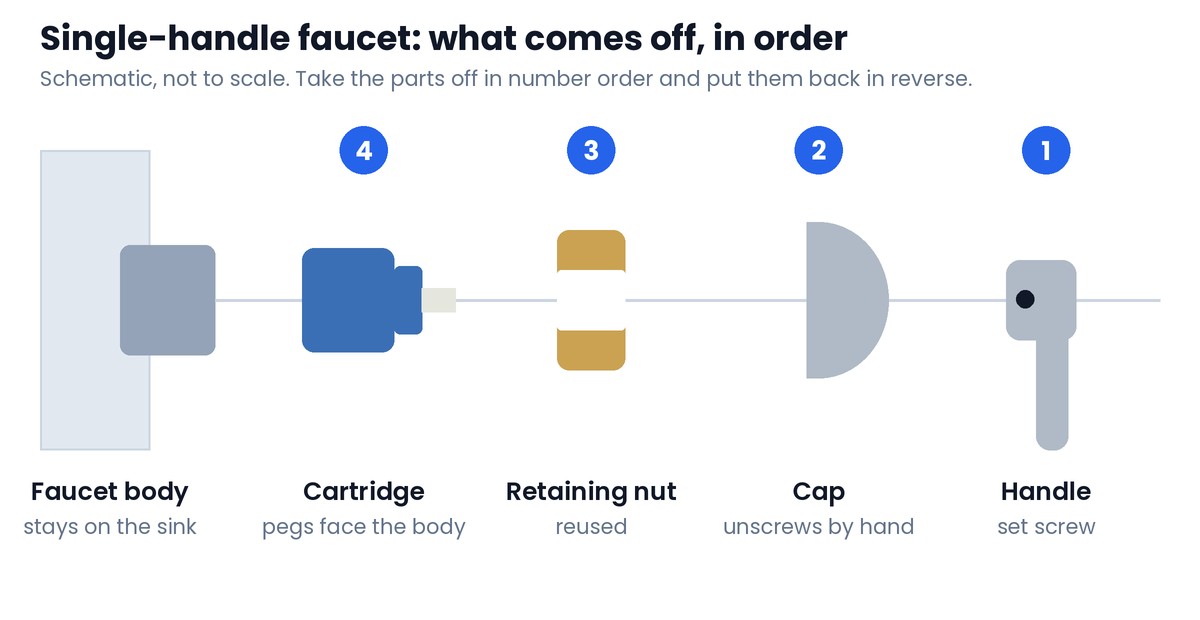
Close both supply valves under the sink. Open the faucet with the handle in the middle so both sides drain, and leave it open until the water stops. Cover the drain.
Step 2: Take off the handle
The handle is held by one small set screw, and how you reach it depends on the model. In Glacier Bay's guides the lever itself unscrews to reach it on some models, a small plate comes off on others, and some handles have a small index plug. If yours has a plug, This Old House suggests prying it off with a pocketknife. Loosen the screw with the hex key and lift the handle off the stem.
Step 3: Unscrew the cap
Under the handle is a rounded cap. It unscrews counterclockwise by hand. If it will not turn, Globe Union's faucet support pages suggest wrapping it with a rubber glove for a better grip.
Step 4: Remove the retaining nut
The nut under the cap is what holds the cartridge down. Glacier Bay's guides call it a retainer nut, a locking nut, a locknut or a bonnet nut, depending on the model. Unscrew it counterclockwise with the adjustable pliers and set it aside. You will put this same nut back.
Step 5: Lift out the old cartridge
Hold the stem and pull the cartridge straight up. Danco notes that these can stick a little: if yours does, grip it gently with pliers and pull. Now is the time to measure it against the list above.
Step 6: Clean where the cartridge sits
Glacier Bay's reassembly note is short: take care to clean the surface the seals touch. Danco says to clean the inside of the faucet body with a cleaner made for mineral build-up, or with plain vinegar. Family Handyman adds to check for bits of old gasket and to wipe the surface with a cloth or a fine nylon pad. Danco also suggests a little silicone grease on the rubber seals to help them last. Use silicone grease only. Glacier Bay warns against letting plumber's putty, pipe dope or any other oil-based compound touch plastic parts.
Step 7: Seat the new cartridge

Look at the base of the new cartridge before it goes in. Make sure the black seal is sitting in its groove. Then lower the cartridge into the faucet body and line up the two pegs with the two holes in the body. Globe Union's instructions are to insert the cartridge and rotate it until it slides down into place. When the pegs find their holes, the cartridge drops and sits flat. If it is not sitting flat, it is not lined up yet. Do not use the nut to force it down.
Step 8: Refit the retaining nut
Thread the nut on by hand. Glacier Bay's guides say to tighten it enough to guarantee the seal while the handle still moves smoothly. Globe Union gives a number to work to: hand tight, then a quarter turn with the pliers.
Step 9: Put the cap and handle back
Thread the cap on by hand, set the handle over the square stem and tighten the set screw. Push the plug or plate back in if your handle has one.
Step 10: Turn the water on slowly and flush
Take the aerator off the end of the spout first, as Glacier Bay's guides do before flushing. Then follow Family Handyman: open the faucet to the middle position, open the shutoff valves gradually, and leave the faucet open until the water runs freely and the air is out of the lines. Family Handyman explains that early ceramic disc faucets could crack under a blast of pressurized air, which is why the faucet stays open while the water comes back.
Run hot and cold water for at least one minute to clear any debris, as Glacier Bay's guides say. Then shut the faucet off and put the aerator back.
Step 11: Check for leaks
Close the faucet and look for a drip at the spout. Then look under the handle and under the sink. A little water at the base of the handle means the retaining nut needs slightly more. Take the handle off, tighten the nut a little and test again.
If it still leaks or runs unevenly
These come straight from the troubleshooting charts in Glacier Bay's and AquaSource's guides.
| What you notice | What the guides say | What to do |
|---|---|---|
| Leak under the handle | The nut has come loose, or the seal on the cartridge is dirty or damaged | Tighten the nut. Clean or replace the seal. |
| Water will not shut off completely | The cartridge is dirty or broken | Remove the handle and check the cartridge. Clean it or replace it. |
| Uneven or weak stream | The aerator is dirty, or the cartridge may be clogged | Clean the aerator screens. Then check the cartridge for debris. |
| Drip from the spout with the faucet off | The nut is not tight enough, or the cartridge is damaged | Retighten the nut. If the drip stays, replace the cartridge. |
When to stop and call a plumber
- A shutoff valve under the sink will not close, or leaks when you turn it.
- The retaining nut is seized and the faucet body turns with it.
- The faucet body is cracked, or water shows up under the sink after the repair.
Frequently asked questions
How do I know my Glacier Bay faucet takes a 35 mm cartridge?
Measure the old cartridge. This one is 35 mm, about 1-3/8 in., across the body, with a square stem, three ports in the base and two locating pegs. Glacier Bay single-handle faucets do not all use the same cartridge, and this 35 mm cartridge does not fit a faucet body made for the smaller 25 mm size.
Does the cartridge come with the retaining nut?
No. The FourHome 35 mm cartridge is the cartridge only, with its seal fitted. Reuse the retaining nut and the cap from your faucet.
Why does my faucet leak under the handle after I changed the cartridge?
Glacier Bay's troubleshooting charts point to the nut that holds the cartridge: it has come loose, or the seal on the cartridge is dirty or damaged. Take the handle off, tighten the nut a little and test again. If it still leaks, lift the cartridge out and check that the seal is clean and seated.
Hot and cold are reversed after the swap. What happened?
This cartridge is located by two pegs on its base, so it should seat in the faucet body one way. Home Depot's cartridge guide notes that when a single-handle faucet runs hot on the cold side, the fix is to go back in and rotate the cartridge half a turn. If yours will only seat one way and is still reversed, compare the new cartridge with the old one, peg for peg, before you do anything else.
Is a Glacier Bay cartridge covered by warranty?
Glacier Bay's limited lifetime warranty covers the original consumer purchaser, and its guides say defective parts are replaced free of charge with proof of purchase. If you bought the faucet and still have the receipt, call Glacier Bay at 1-855-HD-GLACIER (1-855-434-5224) before you buy a part.
Sources
Every step above comes from these documents. We opened each one on October 2, 2026.
- Glacier Bay use and care guides hosted by The Home Depot: bathroom faucet AC78CC211ISTEX, pull-down kitchen faucet AC78CC557PEISTEX, pull-out kitchen faucet AC65CC576ISTHD, lavatory faucet 67732W series, Paulina kitchen faucet HD67780 series and kitchen faucet HDQFS6A0276BL: shutoff caution, part names, cartridge removal, tightening, flushing, troubleshooting and warranty.
- AquaSource guides hosted by Lowe's: pull-down kitchen faucet FP4AC057NP and kitchen faucet 67534-1208D2: the hex wrench in the parts list, and troubleshooting.
- Danco, GB-1 Ceramic Cartridge for AquaSource and Glacier Bay Single-Handle Faucets, model 89902: faucet models, removal, cleaning, seating and reassembly.
- Globe Union, How Do I Install a Ceramic Disc Cartridge for a Single Handle Faucet: cap, locking nut, locating pins, quarter turn.
- Family Handyman, How to Repair a Kitchen Faucet: cleaning the valve and turning the water back on.
- This Old House, How to Repair a Leaky Faucet: the index cover over the handle screw.
- The Home Depot, How to Replace a Cartridge in a Faucet: reversed hot and cold.
Replacement cartridges and stems for Glacier Bay, Delta, Moen, Kohler, Pfister and more, shipped from Amazon fulfillment centers with Prime delivery.
See the full FourHome assortment on AmazonFourHome is an independent brand and is not affiliated with Glacier Bay, The Home Depot, AquaSource, Lowe's or Danco. Brand names, model numbers and part numbers are used only to identify compatibility. Follow the guide that came with your faucet, and call a licensed plumber if a shutoff valve will not close or you are not sure of a step.
FourHome is not affiliated with or endorsed by any faucet manufacturer. Brand names and part numbers are used only to identify compatibility.